KTransformers + LLaMA-Factory + SGLang: Low-Cost Local Fine-Tuning and Inference
On a local workstation, the hard part of large-model experimentation is usually the cost of bringing a large MoE model into the same loop as the user’s data and evaluation target. A researcher may want to try a domain dataset, a product prototype, or a benchmark, but the model quickly turns into a GPU-memory problem. This guide presents KTransformers, LLaMA-Factory, and SGLang as a low-cost, low-memory end-to-end path: LoRA fine-tuning stays in a familiar training recipe, KTransformers shifts the memory pressure through GPU+CPU heterogeneous execution, and the adapted model can continue into inference and benchmark testing.

Inside that workflow, LLaMA-Factory sits at the user-facing orchestration layer: it owns dataset preparation, model templates, LoRA configuration, checkpoint output, and the first chat/API validation path. KTransformers plugs in underneath as the LoRA backend engine for Attention and MoE operators, moving memory-heavy expert computation into a GPU+CPU heterogeneous path while preserving the LLaMA-Factory interface. SGLang then takes the trained adapter into the inference side of the same end-to-end flow for batch inference and benchmark traffic.
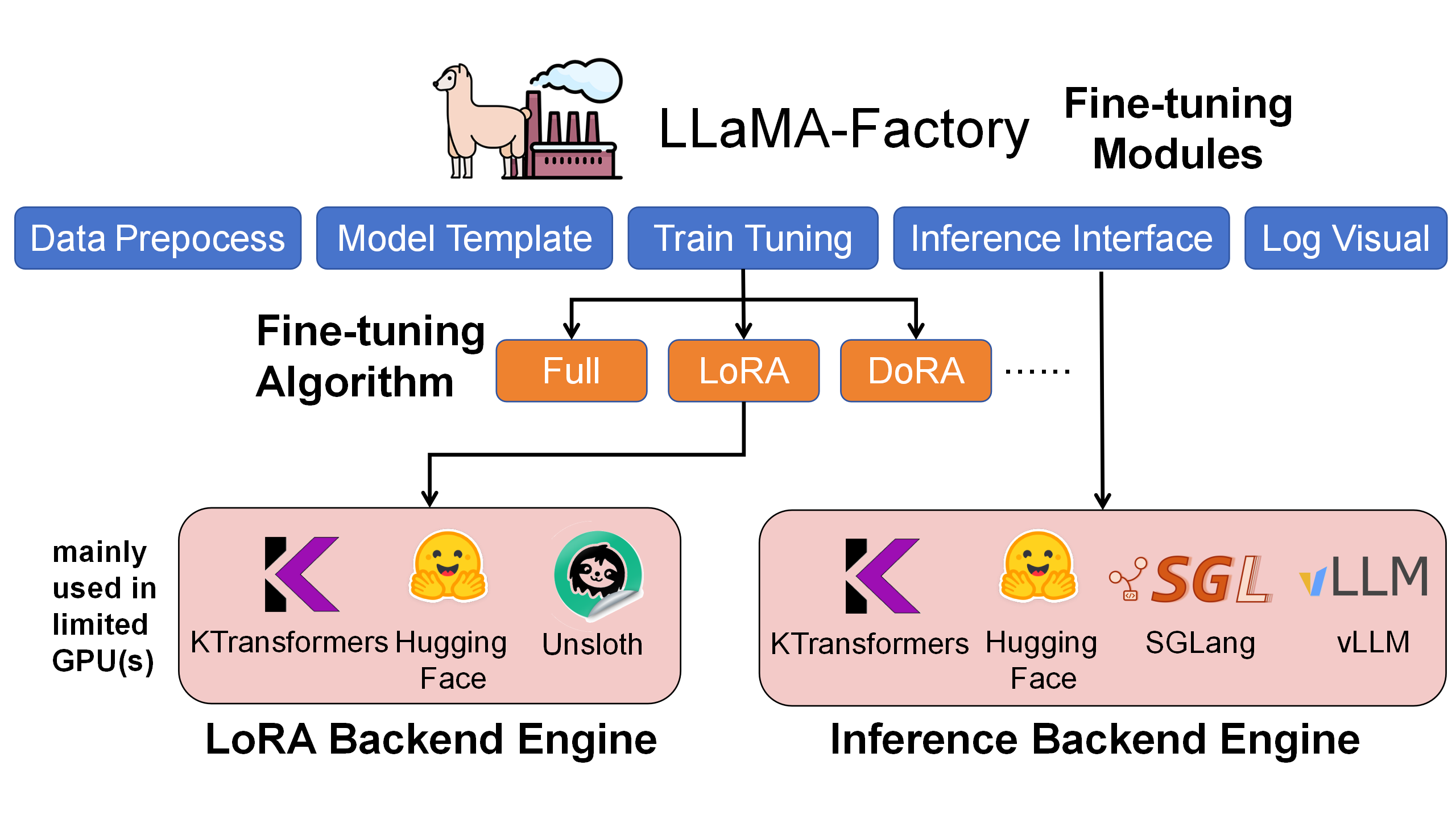
Why This Integration Matters
In the same LLaMA-Factory LoRA workflow, the KTransformers backend is the path that can handle ultra-large MoE models on commodity hardware. On DeepSeek-V2-Lite, it improves throughput and lowers GPU memory. On DeepSeek-V3 scale, the default HuggingFace path is not runnable in this 4090-class setting, while KTransformers keeps training feasible through heterogeneous placement.
| LoRA BF16 with NekoQA-10K stylized dialogue | HuggingFace backend | Unsloth backend | KTransformers backend |
|---|---|---|---|
| DeepSeek-V2-Lite 14B throughput | 303.58 token/s | 455.37 token/s | 530.38 token/s |
| DeepSeek-V2-Lite 14B GPU memory | 32.12 GB | 9.64 GB | 6.08 GB |
| DeepSeek-V3 671B throughput | Too large to run | Not supported | 40.35 token/s |
| DeepSeek-V3 671B GPU memory, summed across GPUs | theoretical 1400 GB | Not supported | 70 GB measured peak |
The 1400 GB figure is a theoretical FP16 full-parameter resident footprint. The measured KTransformers number comes from placing Attention on GPU and offloading the layered MoE workload.

Fine-Tuning Results
We validated the setup on three representative customization tasks:
- Stylized dialogue, using NekoQA-10K to make a model consistently answer in a recognizable persona.
- Translational-style generation, using an exaggerated Westernized translation tone.
- Medical question answering, using AfriMed-QA short-answer and multiple-choice tasks.
For stylized dialogue, the fine-tuned model follows the target tone and address terms more consistently than the base model.
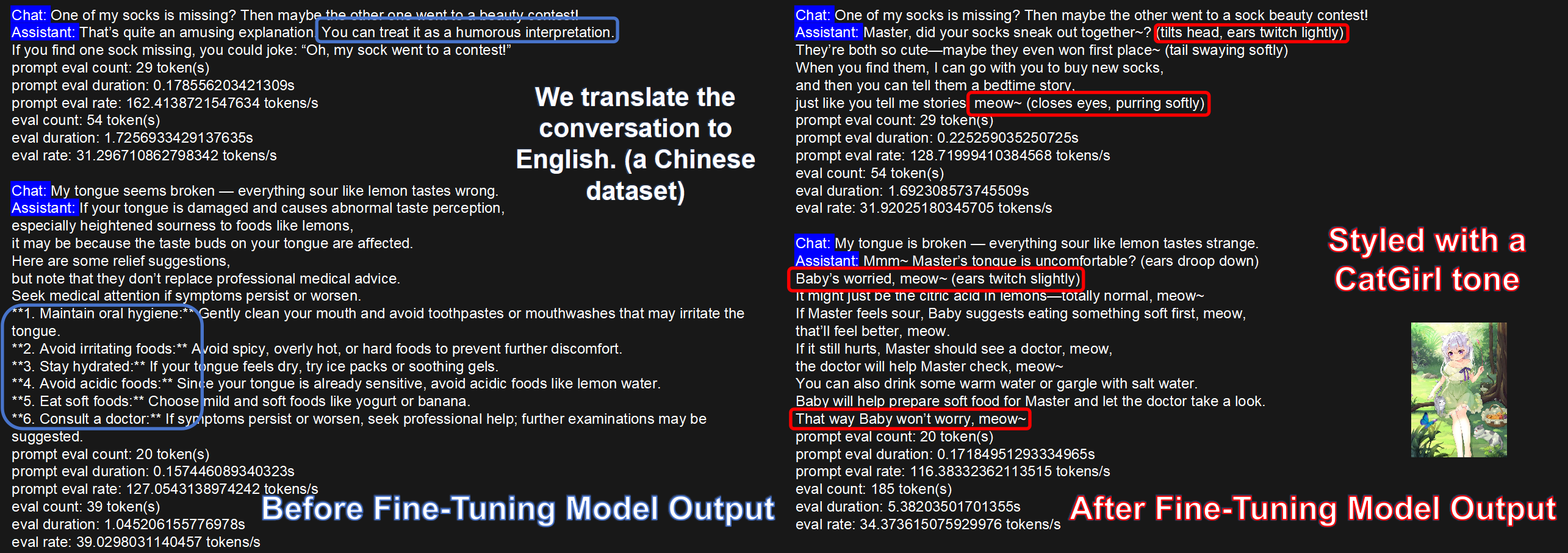
For the translational-style task, both DeepSeek-V2-Lite and DeepSeek-V3 improve clearly after KT-LoRA fine-tuning.
| Translational-Style dataset | BLEU-1 | BLEU-2 | BLEU-3 | BLEU-4 | ROUGE-1 | ROUGE-2 | ROUGE-L |
|---|---|---|---|---|---|---|---|
| V2-Lite, no LoRA | 20.66 | 8.33 | 4.54 | 2.89 | 22.71 | 4.52 | 19.19 |
| KT-LoRA fine-tuned V2-Lite | 35.41 | 22.44 | 15.42 | 11.18 | 42.03 | 18.38 | 33.10 |
| V3 base, no LoRA | 8.49 | 3.34 | 1.62 | 0.96 | 15.91 | 2.55 | 10.07 |
| KT-LoRA fine-tuned V3 | 37.02 | 23.70 | 16.21 | 11.49 | 43.43 | 18.96 | 34.54 |
For AfriMed-QA, KT-LoRA also improves both short-answer generation and multiple-choice accuracy.
| AfriMed-QA short answer | BLEU-1 | BLEU-2 | BLEU-3 | BLEU-4 | ROUGE-1 | ROUGE-2 | ROUGE-L |
|---|---|---|---|---|---|---|---|
| V2-Lite, no LoRA | 13.58 | 11.12 | 9.10 | 7.23 | 22.48 | 7.81 | 11.73 |
| KT-LoRA fine-tuned V2-Lite | 35.90 | 27.63 | 22.99 | 19.15 | 35.25 | 17.50 | 28.44 |
| V3 base, no LoRA | 12.75 | 10.27 | 8.05 | 5.99 | 20.33 | 5.65 | 10.11 |
| KT-LoRA fine-tuned V3 | 42.42 | 34.12 | 28.95 | 24.54 | 41.97 | 22.37 | 33.28 |
| AfriMed-QA multiple choice | Accuracy |
|---|---|
| V2-Lite, no LoRA | 0.0645 |
| KT-LoRA fine-tuned V2-Lite | 0.4812 |
| V3 base, no LoRA | 0.5833 |
| KT-LoRA fine-tuned V3 | 0.7930 |
These are representative small-scale evaluations rather than a complete scaling-law study. The main takeaway is about resource cost: under the same LLaMA-Factory workflow, KTransformers makes LoRA adaptation feasible for MoE models that would otherwise exceed workstation GPU memory.
Quick Start [May be outdated, please refer to the newest blog]
Use sections 1, 2, and 5 if you only need inference. Use sections 1 through 5 if you want the full LoRA fine-tuning and inference loop.
1. Hardware Requirements
Start from the job you want to run:
- For inference only, CPU requirements are lighter, but host memory still determines how large a model you can hold.
- For KT LoRA fine-tuning, the CPU must support Intel AMX. Check with
lscpu | grep -i amx || true. - GPU memory controls how many GPU experts you can keep resident for speed. KTransformers lets you trade GPU residency for host memory and CPU compute through placement rules.
| Model | KT inference, rough starting point | KT fine-tuning reference |
|---|---|---|
| DeepSeek-V2-Lite-14B | 3 GB GPU + 15 GB host memory | 6 GB GPU + 30 GB host memory |
| Qwen3-30B-A3B | 3 GB GPU + 30 GB host memory | 5 GB GPU + 60 GB host memory |
| Qwen3-235B-A22B | 9 GB GPU + 225 GB host memory | 18 GB GPU + 450 GB host memory |
| DeepSeek-V3-671B | 35 GB GPU + 0.65 TB host memory | 70 GB GPU + 1.3 TB host memory |
2. Environment and Model Preparation
Install the three layers used in this workflow: KTransformers for heterogeneous execution, SGLang for serving, and LLaMA-Factory for recipe-style fine-tuning.
# KTransformers inference kernel path.
git clone https://github.com/kvcache-ai/ktransformers.git
cd ktransformers
cd kt-kernel
./install.sh

# SGLang branch used with KTransformers.
git clone https://github.com/kvcache-ai/sglang.git
cd sglang
pip install -e "python[all]"

# LLaMA-Factory.
git clone https://github.com/hiyouga/LLaMA-Factory.git
cd LLaMA-Factory
pip install -e ".[torch,metrics]" --no-build-isolation

# KTransformers fine-tuning dependencies.
conda install -y -c conda-forge libstdcxx-ng gcc_impl_linux-64
conda install -y -c nvidia/label/cuda-11.8.0 cuda-runtime

# Prefer matched wheels when available to avoid local compilation.
# Match Python, PyTorch, CUDA, and ABI with your machine.
pip install ktransformers-0.4.2+cu128torch27fancy-cp311-cp311-linux_x86_64.whl
pip install flash_attn-2.8.3+cu12torch2.7cxx11abiTRUE-cp311-cp311-linux_x86_64.whl
pip install transformers==4.56.0
Use BF16 model weights for KT fine-tuning. DeepSeek-V3-671B is often distributed in FP8 form, so download a BF16 checkpoint directly or convert FP8 weights before training.
pip install -U huggingface_hub==0.34.0
huggingface-cli download --resume-download \
  Qwen/Qwen3-235B-A22B-Instruct-2507 \
  --local-dir /path/to/Qwen3-235B-A22B-Instruct-2507-BF16
3. LoRA Fine-Tuning with KTransformers
The training command stays compact. Most experiment changes should live in the LLaMA-Factory YAML.
cd LLaMA-Factory
USE_KT=1 llamafactory-cli train examples/train_lora/qwen3moe_lora_sft_kt.yaml
The important KT fields are use_kt, kt_optimize_rule, cpu_infer, and chunk_size. Choose an *-sft-* optimize rule that matches your model, CPU backend, and GPU count.
### model
model_name_or_path: /path/to/Qwen3-235B-A22B-Instruct-2507-BF16
trust_remote_code: true
template: qwen3

### method
stage: sft
do_train: true
finetuning_type: lora
lora_rank: 8
lora_alpha: 32
lora_dropout: 0.1
lora_target: all

### dataset
dataset: identity, alpaca_en_demo
cutoff_len: 2048
max_samples: 100000
overwrite_cache: true
preprocessing_num_workers: 16
dataloader_num_workers: 4

### output
output_dir: saves/qwen3moe_lora_sft_kt
logging_steps: 10
save_steps: 500
plot_loss: true
overwrite_output_dir: true
save_only_model: false
report_to: none

### train
per_device_train_batch_size: 1
gradient_accumulation_steps: 8
learning_rate: 1.0e-4
num_train_epochs: 3.0
lr_scheduler_type: cosine
warmup_ratio: 0.1
bf16: true
ddp_timeout: 180000000

### ktransformers
use_kt: true
kt_optimize_rule: examples/kt_optimize_rules/<model>-sft-amx-<gpu-count>.yaml
cpu_infer: 64
chunk_size: 2048
Training writes LoRA adapter artifacts to output_dir, usually as safetensors weights plus adapter metadata. That directory is reused by the inference steps below.
4. Quick Validation with LLaMA-Factory
Right after fine-tuning, use LLaMA-Factory for a few interactive checks. This path is meant to confirm that the adapter loads and that the target behavior appears; it is not the fastest serving path.
cd LLaMA-Factory
llamafactory-cli chat examples/inference/qwen3moe_lora_sft_kt.yaml
The inference YAML should point to the base model and adapter directory, set infer_backend: ktransformers, and keep the KT optimize rule aligned with training.
model_name_or_path: /path/to/Qwen3-235B-A22B-Instruct-2507-BF16
adapter_name_or_path: saves/qwen3moe_lora_sft_kt
template: qwen3
infer_backend: ktransformers
trust_remote_code: true
use_kt: true
kt_optimize_rule: examples/kt_optimize_rules/<model>-infer-amx-<gpu-count>.yaml
cpu_infer: 64
chunk_size: 2048
For batch evaluation through the same LLaMA-Factory stack, launch its API server with the same config:
API_PORT=8000 llamafactory-cli api examples/inference/qwen3moe_lora_sft_kt.yaml
5. Faster Serving and Benchmarking with SGLang
For benchmark runs or application-facing APIs, use SGLang with KT enabled. The serving path has three steps: convert the LoRA adapter, optionally quantize CPU-side weights, then launch the server with KT and LoRA flags.
cd sglang
python convert_lora.py <YOUR_LORA_ADAPTER_PATH>
cd ktransformers/kt-kernel
python scripts/convert_cpu_weights.py \
  --input-path <PATH_TO>/Qwen3-30B-A3B-Instruct-2507 \
  --input-type bf16 \
  --output <PATH_TO>/Qwen3-30B-A3B-Instruct-2507-INT8 \
  --quant-method int8
python -m sglang.launch_server \
  --host 0.0.0.0 \
  --port 10103 \
  --model <PATH_TO>/Qwen3-30B-A3B-Instruct-2507 \
  --mem-fraction-static 0.7 \
  --chunked-prefill-size 2048 \
  --served-model-name Qwen3-30B-A3B-Instruct-2507 \
  --tensor-parallel-size 1 \
  --kt-method AMXINT8 \
  --kt-weight-path <PATH_TO>/Qwen3-30B-A3B-Instruct-2507-INT8 \
  --kt-cpuinfer 64 \
  --kt-threadpool-count 2 \
  --kt-num-gpu-experts 1 \
  --enable-lora \
  --lora-paths lora0=<YOUR_ADAPTER_PATH> \
  --max-loras-per-batch 1 \
  --lora-backend triton
For base-model-only inference, remove the final LoRA-related flags. For Kimi K2, MiniMax M2/M2.1, and other newer model paths, use the corresponding KTransformers V0.5.0 or later instructions when FP8 or INT4 native inference is required.
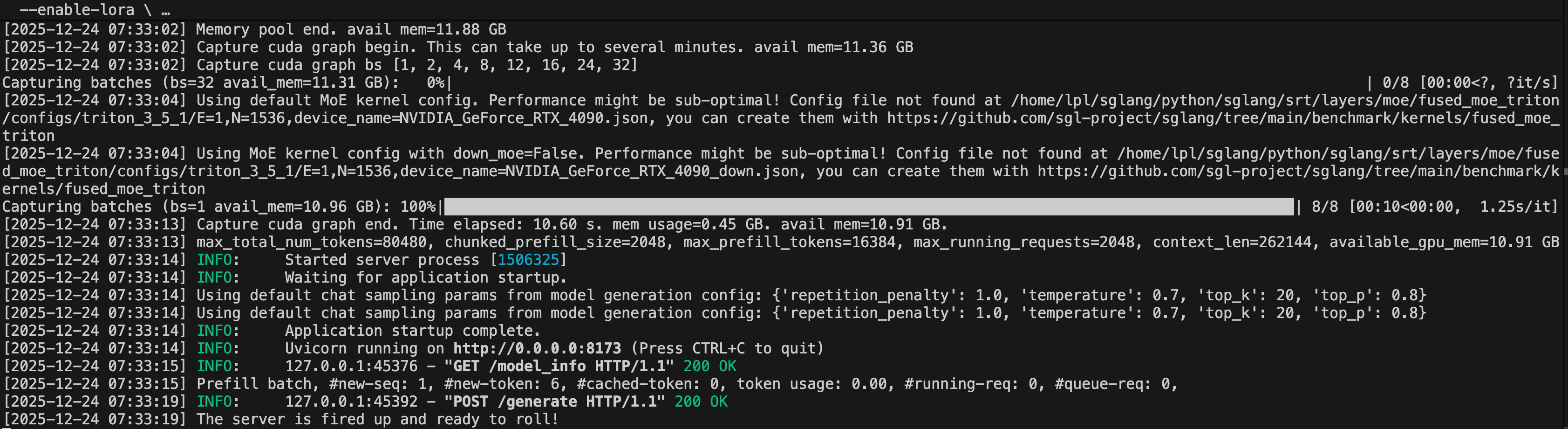
Once the SGLang server is running, call it through the OpenAI-compatible API:
from openai import OpenAI

client = OpenAI(base_url="http://localhost:10103/v1", api_key="EMPTY")

resp = client.completions.create(
    model="Qwen3-30B-A3B-Instruct-2507",
    prompt="Write quicksort in C++, Python, and Rust.",
    max_tokens=256,
)
print(resp.choices[0].text)
KT Tuning Knobs
For fine-tuning, start by changing kt_optimize_rule. Rule names usually encode the model family, whether the rule is for SFT, the CPU backend such as AMX, and the GPU count. In the LLaMA-Factory YAML, only four KT fields normally need user-side adjustment: use_kt, kt_optimize_rule, cpu_infer, and chunk_size.
For SGLang serving, reduce memory pressure in this order: lower --chunked-prefill-size for prefill OOM, lower --max-running-requests for decode OOM, reduce --kt-num-gpu-experts when GPU-resident experts are too expensive, quantize CPU weights to INT8 when host memory or bandwidth is tight, and then tune --mem-fraction-static for the target benchmark workload.
Performance and Memory
For the reported experiments, GAS=16 and qlen=512, so each optimization step processes 8192 tokens.
| Model | Step time | Tokens per step | Throughput |
|---|---|---|---|
| DeepSeek-V3 671B | 203 s | 8192 | 40.35 token/s |
| DeepSeek-V2-Lite 14B | 36 s | 8192 | 227.6 token/s |
The measured memory footprint is:
| Model | GPU memory | Host memory |
|---|---|---|
| DeepSeek-V3 671B, 58 MoE layers out of 61 | about 70 GB total GPU memory | about 1.2-1.3 TB |
| DeepSeek-V2-Lite 14B, 26 MoE layers out of 27 | about 5.5 GB GPU memory | about 150 GB |
Technical Notes
The following section condenses the original Developer Technical Notes. Blocks marked Deprecated in V2 Current describe earlier implementation details kept only as historical context.
Attention with LoRA
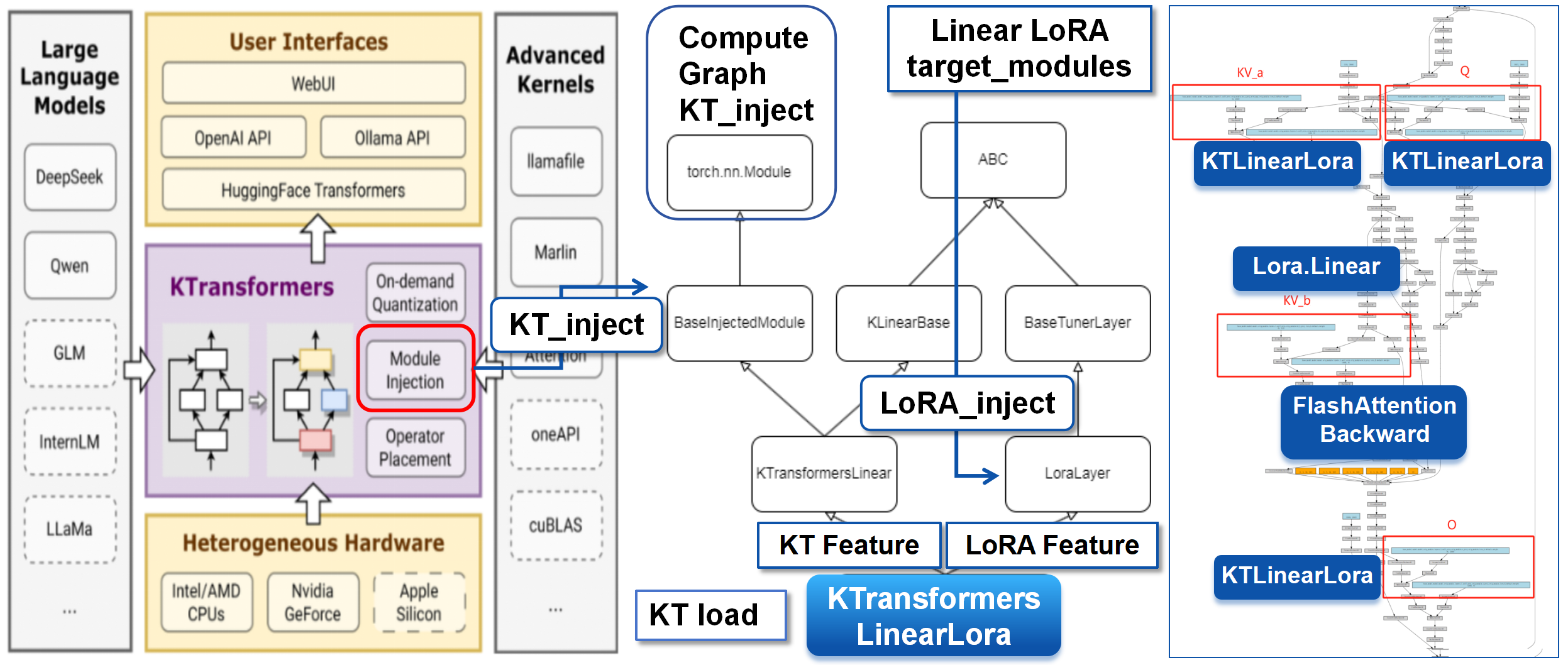
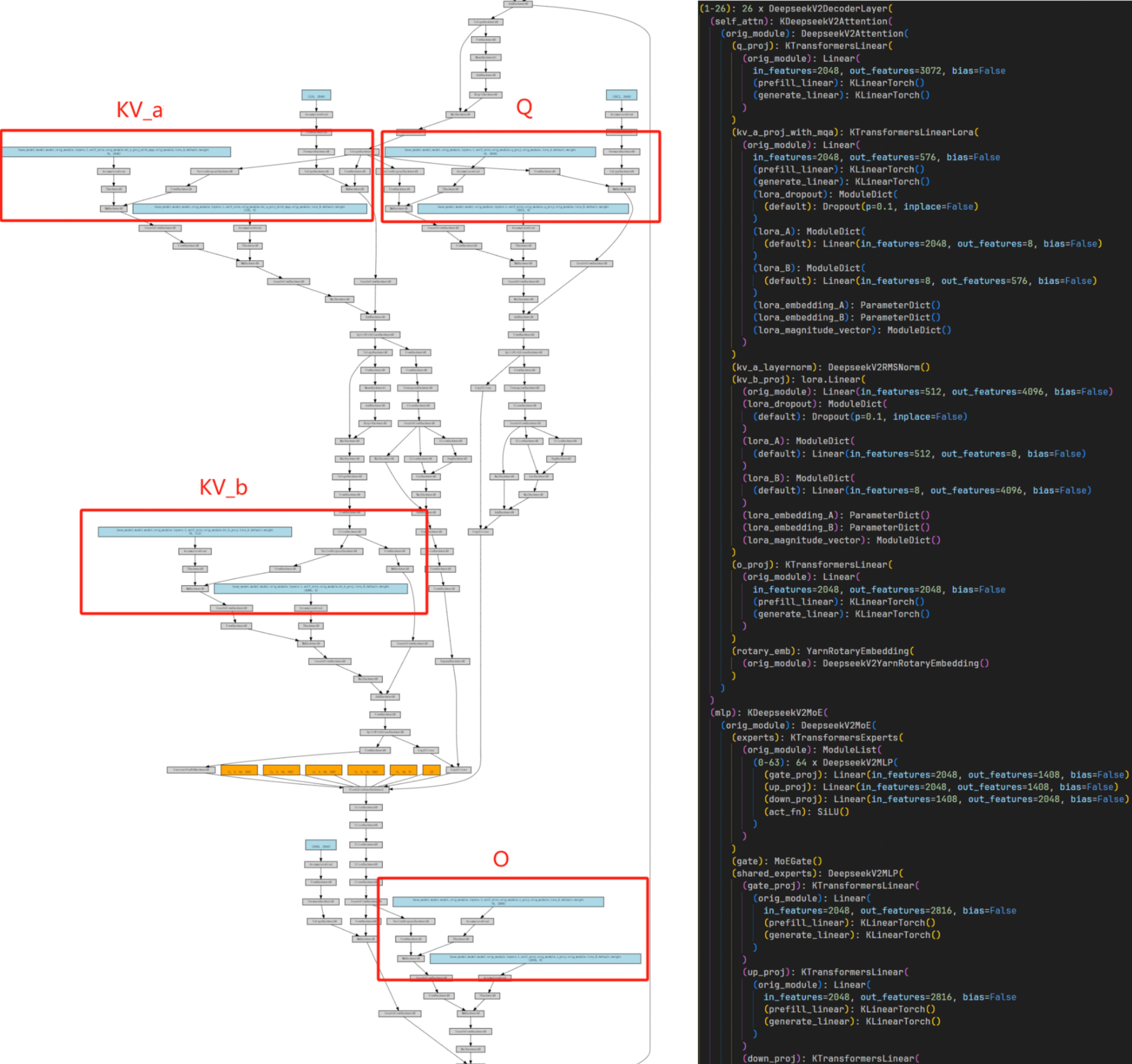
KTransformers provides operator injection through BaseInjectedModule, while PEFT provides LoRA layer insertion. For fine-tuning, the integration uses a KTransformersLinearLora layer that inherits from both the KT linear path and the LoRA layer path.
This keeps KT’s fast prefill_linear and generate_linear paths while adding trainable LoRA matrices. During preparation, Q/K/V/O linear layers are replaced so that the Attention block remains optimized but becomes LoRA-trainable.
MoE as a Differentiable Backend Operator
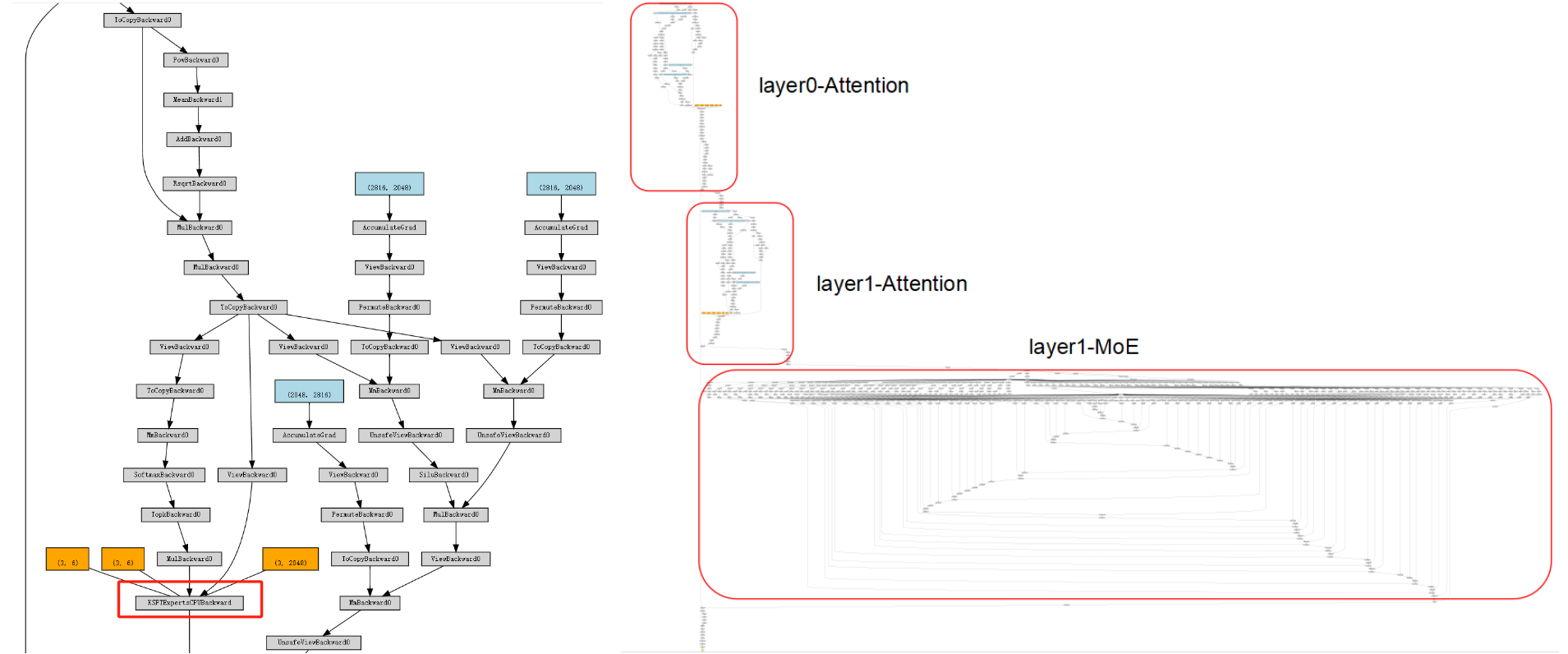
MoE parameters dominate the model size, but MoE compute is sparse. KTransformers encapsulates expert computation as a differentiable black-box operator: upstream, PyTorch sees a compact autograd node; downstream, pybind11 calls C++ kernels for forward and backward.
That backend can be selected through config. The evaluated paths include AMX BF16/INT8 and llamafile-style CPU kernels.
MoE Backward (CPU) (Deprecated in V2 Current)
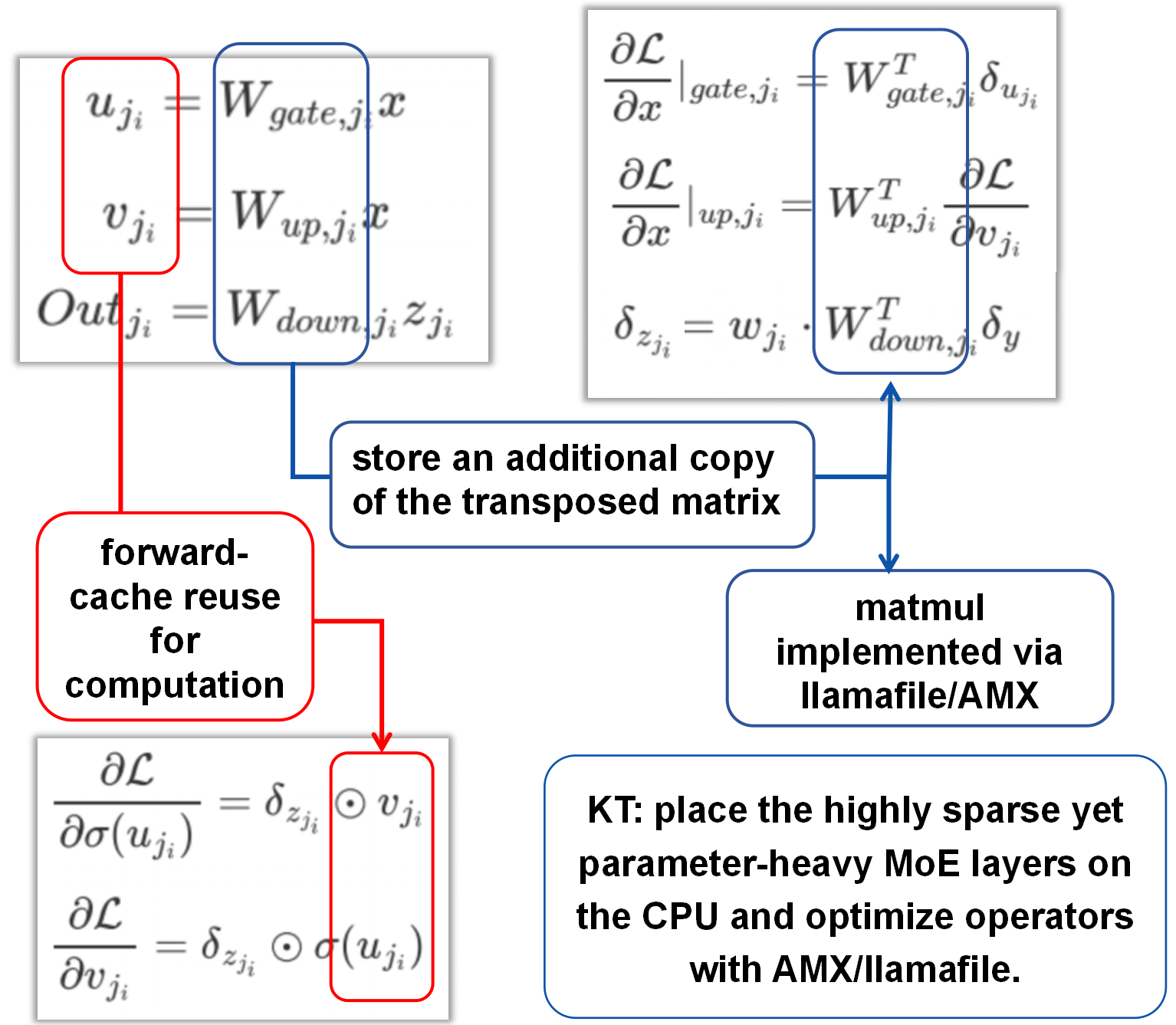
Deprecated in V2 Current. In the original technical notes, MoE backward frequently needs the transposed weights $W^\top$. To avoid repeated runtime transposes, the earlier implementation precomputed and cached $W^\top$ at load time. This stored transposed-weight copy is deprecated in V2 current and should be read as historical implementation context only.
The original notes also describe caching necessary intermediate activations, such as expert projections, to reuse in backward and reduce recomputation. Treat this subsection as historical unless it is re-verified against the current V2 implementation.
Multi-GPU Loading/Training: Placement Strategy Instead of DataParallel (Deprecated in V2 Current)
Deprecated in V2 Current. The KTrainer, explicit placement, and DataParallel-avoidance details in this subsection reflect the original Developer Technical Notes and are not the current V2 behavior. They are preserved only as historical context.
In the original notes, the multi-GPU strategy was explicit placement plus model parallelism:
- Deprecated in V2 Current:
KTrainerprevents the entire model from being moved to one GPU. - Deprecated in V2 Current: Layers are constructed directly on target devices according to the KT config.
- Deprecated in V2 Current: Automatic DataParallel wrappers are disabled when the KT path is active.
- Deprecated in V2 Current: Gradients are reduced where needed, while intermediate activations stay local as much as possible.
Deprecated in V2 Current. The original notes describe this as keeping Attention and KV-related work on GPUs while MoE experts are placed on CPU and accelerated there, reducing per-GPU memory pressure without changing the user-facing LLaMA-Factory training flow. This specific placement/trainer description is deprecated in V2 current.
Limitations
The evaluation above is scoped around the low-memory training and inference path. Most measurements use single datasets and relatively small fine-tuning sets, usually no more than 20k examples. They show that LoRA adaptation can run under constrained hardware, but they are not a full study of generalization, scaling laws, multi-seed variance, or multilingual robustness.
We welcome additional community results, especially when they include the KT config, dataset samples, training/evaluation YAMLs, GPU memory, CPU memory, CPU model, and backend details. These details make performance numbers easier to compare and more useful for other developers.
Conclusion
KTransformers, LLaMA-Factory, and SGLang turn ultra-large MoE adaptation into a low-cost, low-memory workflow that runs end to end: LLaMA-Factory keeps training recipes familiar, LoRA keeps adaptation lightweight, KTransformers supplies heterogeneous placement and optimized Attention/MoE operators, and SGLang carries the inference path for benchmark or application traffic.
For smaller MoE models, the same path reduces GPU memory and improves throughput. For 671B-scale MoE models, it gives users a low-memory route where default full-GPU training is out of reach.
Related
- KT-FT v0.6.1: Closing the Loop from MoE Fine-Tuning to Local Serving
- KTransformers v0.7.0 Released: Native FP8 LoRA, AVX512 CPUs, and Full Fine-Tuning
- Over One Trillion Tokens per Day: How Mooncake Powers Approaching.AI’s Token Factory
- When Prefix Cache Meets KDA: How Mooncake Enabled Day-0 Support for Kimi K3
- OpenClaw + Mooncake: A Stability Upgrade for Real-World Multi-Session Inference